
Plesk for Windows
kb: how-to
Plesk for Linux
ABT: Group B
Applicable to:
- Plesk for Linux
- Plesk for Windows
Question
How to enable/disable HTTP Strict-Transport-Security (HSTS) for a domain in Plesk?
Answer
Note: A valid SSL certificate must be installed on the website, otherwise it'll not be accessible.
Note: The HSTS header won't be sent while the preferred domain is "www". There is an UserVoice created to improve this behavior
-
Install SSL It! extension in Extensions
-
Navigate to Domains > example.com > Hosting Settings and make sure SSL/TLS support is enabled
-
Navigate to Domains > example.com > SSL/TLS Certificates
-
Click on the HSTS button:
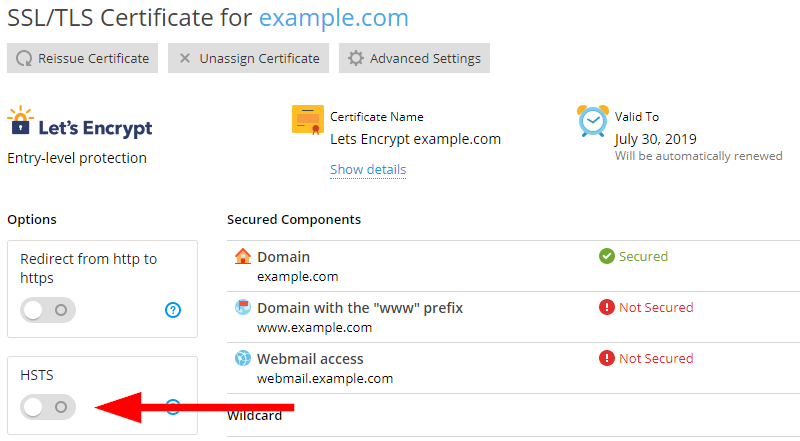
-
Configure the HSTS options and click on Enable (or Disable) HSTS:
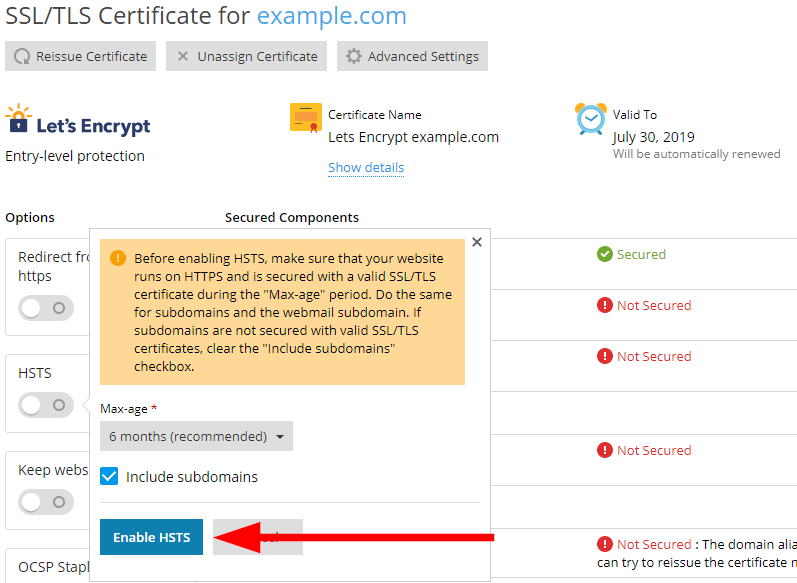
Comments
Plesk tells me that HSTS is active, but it is not working with preload. It would be nice to know how to enable HSTS Preload also.
Nevermind, I just realized you were probably asking how to enabled Preload in Plesk, not in general. Seems like Plesk is still missing support for that.
It seems HSTS is default state is on. Where is the setting to change this to off?
When creating a temporary domain for testing, it doesn't have a certificate and you can not create one. It is a temporary domain. So you can not access you temporary domain.
Please sign in to leave a comment.