
Plesk for Windows
kb: how-to
Plesk for Linux
ABT: Group B
Applicable to:
- Plesk for Linux
- Plesk for Windows
Question
How to change the temporary directory used for storing temporary files for a domain in Plesk?
Answer
Click on a section to expand
Plesk for Linux
-
In Plesk, go to Domains > example.com > PHP Settings.
-
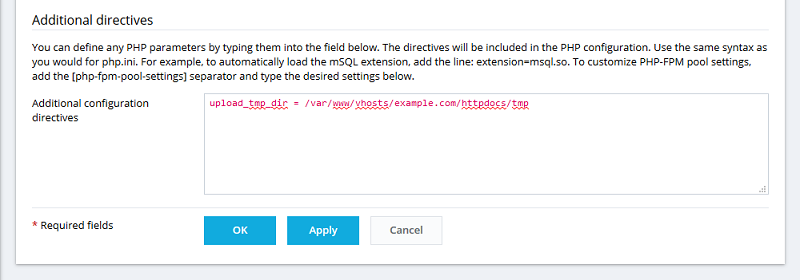
Add the directive "upload_tmp_dir" with a required path to the Additional configuration directives field:
CONFIG_TEXT: upload_tmp_dir = /var/www/vhosts/example.com/httpdocs/tmp
Note: If you are a domain owner and do not have the Additional configuration directives field in PHP Settings, contact your service provider for assistance.
Click on a section to expand
Plesk for Windows
In Plesk for Windows it's not possible to change "upload_tmp_dir" per domain.
PHP settings which changeable on PHP_INI_USER, PHP_INI_PERDIR or PHP_INI_ALL levels can be customized in Plesk for Windows.
"upload_tmp_dir" setting is changeable on PHP_INI_SYSTEM level and can not be customized.
PHP settings which changeable on PHP_INI_USER, PHP_INI_PERDIR or PHP_INI_ALL levels can be customized in Plesk for Windows.
"upload_tmp_dir" setting is changeable on PHP_INI_SYSTEM level and can not be customized.
Comments
Please sign in to leave a comment.