
Applicable to:
- Plesk for Linux
Symptoms
-
Cannot access a specific location of website, e.g.
http://example.com/some_folder, the following error occurs:CONFIG_TEXT: Server Error
403
Forbidden - If CloudLinux operating system is used, its test page is shown:
CONFIG_TEXT: CloudLinux Test Page
This page is used to test the proper operation of the Apache HTTP server after it has been installed. If you can read this page, it means that the Apache HTTP server installed at this site is working properly.
-
The following error appears in the
/var/www/vhosts/example.com/logs/error_logfile:CONFIG_TEXT: [autoindex:error] [pid 16314:tid 140300215322368] [client 203.0.113.2:55714] AH01276: Cannot serve directory /var/www/vhosts/example.com/httpdocs/some_folder/: No matching DirectoryIndex (index.html,index.cgi,index.pl,index.php,index.xhtml,index.htm,index.shtml) found, and server-generated directory index forbidden by Options directive
Cause
The requested directory does not contain index files or directory browsing is not enabled.
Resolution
Apply one of the following solutions (depending on the desired goal):
- Log into Plesk.
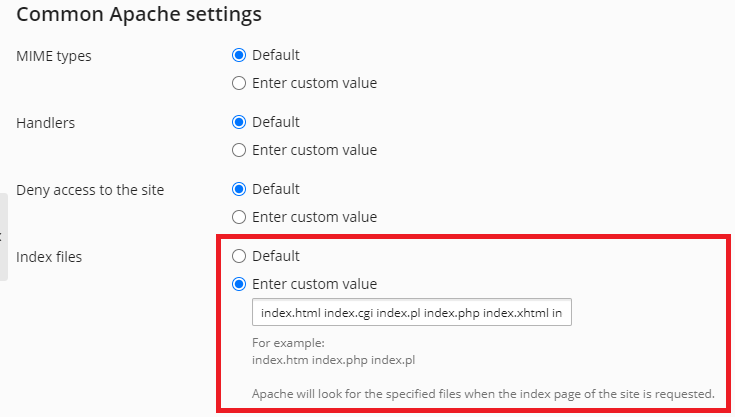
- Check what index files defined in Domains > example.com > Apache & nginx Settings:
- Go to Domains > example.com > File Manager.
- (Optional) Navigate to the required folder, e.g.
some_folder. - Click the New > Create File button.
-
Specify one of the following names according to file name from step 2:
-
index.html
-
index.cgi
-
index.pl
-
index.php
-
index.xhtml
-
index.htm
-
index.shtml
and press the OK button.
-
-
Click on the created file and insert the required content.
The video below demonstrates an example of the process
- For Plesk on Linux: How to enable/disable directory browsing on Plesk for Linux?
- For Plesk on Windows: How to disable/enable Directory Browsing for a domain in Plesk for Windows
Comments
Hello.
Is it a real problem?
bei mir hilft es nicht!!!
Please sign in to leave a comment.