
Applicable to:
- Plesk for Linux
- Plesk for Windows
Question
How to configure SpamAssassin for a specific mailbox?
Answer
The SpamAssassin spam filter identifies spam messages among emails sent to mailboxes hosted on a Plesk server and allows setting it up to apply different actions to spam.
Spam filter cannot be configured at the server level: it is supported on a per-mailbox basis only.
For example, to automatically delete messages marked as spam by SpamAssassin for a mailbox, follow the instructions below:
-
Make sure SpamAssassin is enabled on a mailbox:
Domains > example.com > Mail > Mail Accounts > Spam Filter > Switch on spam filtering for this email address; -
Specify to remove messages classified as spam: select the
Delete all spam messagesoption: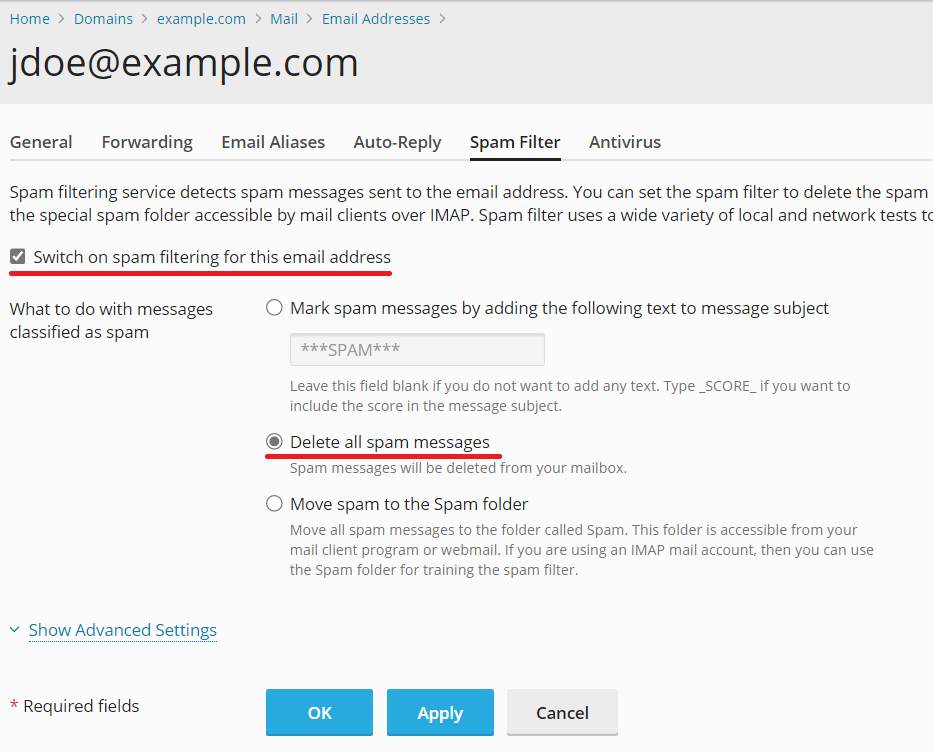
Additional detail
See more details about server-wide SpamAssassin configuration and mailbox SpamAssassin configuration.
Comments
Please sign in to leave a comment.