
kb: technical
Plesk Onyx for Linux
ABT: Group A
Applicable to:
- Plesk Onyx for Linux
- Plesk 12.5 for Linux
- Plesk 12.0 for Linux
- Plesk 11.x for Linux
Symptoms
Unable to connect to FTP server on Plesk:
# ftp domain.tld 21
550 SSL/TLS required on the control channel
Login failed.
Remote system type is UNIX.
Using binary mode to transfer files.
Cause
Allow only secure FTPS connections
option is enabled.
Resolution
- Log into Plesk
- Set
Allow both secure FTPS and non-secure FTP connectionsin
Plesk > Tools & Settings > Security Policy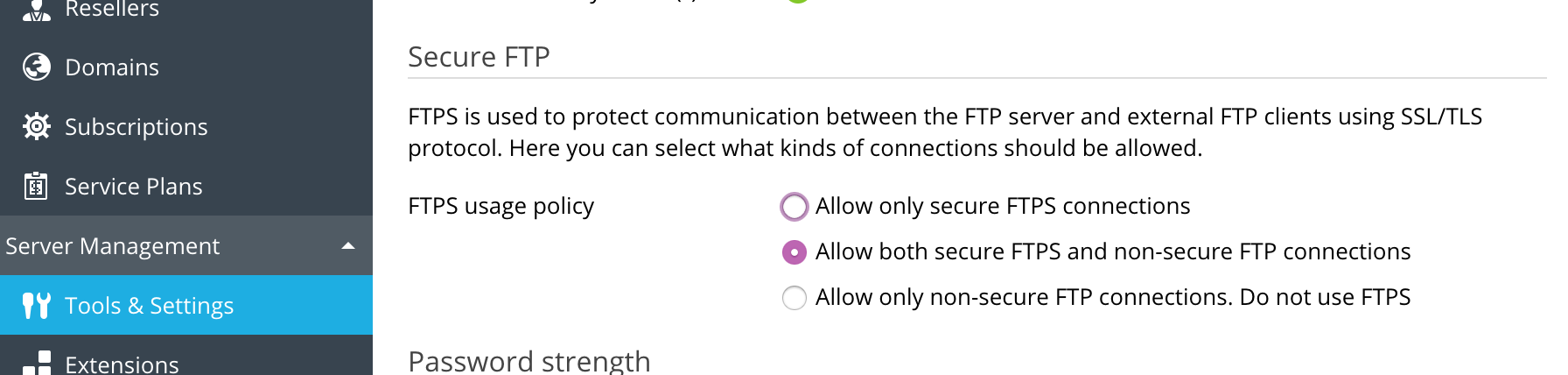
Comments
Please sign in to leave a comment.